TI-84 Calculator Online
The full power of the TI-84 Plus graphing calculator right in your browser. Graph equations, solve algebra, crunch statistics, and ace your exams instantly. Free TI-84 Plus CE calculator online — graph, solve & run stats in your browser, no download, no sign-up. Works on Chromebook, phone & desktop.
Start Calculating — it's on this page Read Manual
TI-84 calculator online · TI-84 Plus calculator online · online graphing calculator TI-84
TI-84 Calculator — use it right here
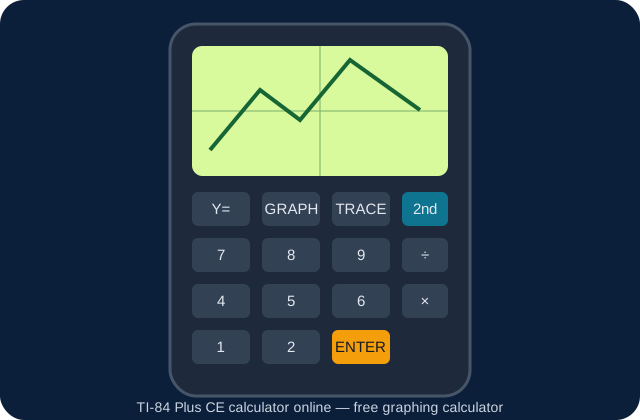
This is the real Texas Instruments TI-84 Plus CE emulator, with the same keypad, screen and menus as the physical calculator. Press Y= to enter a function, GRAPH to plot it, WINDOW and ZOOM to adjust the view, TRACE to read points, STAT for lists and statistics, and 2ND → MATRIX for matrices. Use the − / + buttons above the calculator to zoom the emulator in or out.
Full guide: How to Graph on a TI-84 Calculator Online → · How to Do Statistics → · How to Use Matrices →
Everything the Physical Calculator Does
Our online TI-84 emulator replicates the key features of the physical graphing calculator for free.
Graph Functions
Plot multiple equations simultaneously, zoom in/out, trace graphs, and find intercepts, maxima & minima.
Full Arithmetic
Perform all basic and advanced arithmetic operations, including order-of-operations-aware expressions.
Statistics & Regression
Run 1-Var Stats, LinReg, QuadReg, and more. Perfect for AP Statistics and college-level coursework.
Matrix Operations
Enter, edit, and perform operations on matrices including inverse, determinant, and row reduction.
Trigonometry
sin, cos, tan and their inverses in both degree and radian mode. Unit circle values at your fingertips.
Calculus Tools
Numerical derivatives (nDeriv) and definite integrals (fnInt) for calculus students and beyond.
How to Use the TI-84 Online Calculator
Get up and running in seconds, no experience required.
- Use the calculator above. It loads instantly in your browser with no app, no plugin, no account needed.
- Click the keys on the real TI-84 Plus CE keypad. Tap the on-screen keys with your mouse or touchscreen, exactly as on the physical calculator. Use the − / + zoom buttons above the calculator if the keypad is too small or too large on your screen.
- Graph an equation. Enter your equation in the Y= editor (e.g. Y1 = 2X + 3). Then press GRAPH to see it plotted on the coordinate plane. Use ZOOM to adjust the view.
- Run statistical analysis. Press STAT → EDIT to enter your data in a list, then STAT → CALC for 1-Var Stats or LinReg.
- Access advanced functions. On the physical calculator, use the 2ND key to access secondary functions printed above each button, and the ALPHA key to enter letters for storing variables.
- Clear & start fresh. Press CLEAR to erase the current line. On the physical calculator, press 2ND + MEM → Reset to restore factory defaults and clear all stored data. How to clear TI-84 memory →
TI-84 Guides
Step-by-step guides with the exact keystrokes for the real calculator — and the matching tool on this page.
How to Graph on a TI-84
Y=, WINDOW, ZOOM, TRACE, and finding intercepts and intersections.
How to Do Statistics
1-Var Stats, LinReg, histograms and boxplots.
How to Use Matrices
Inverse, determinant, and solving systems of equations.
How to Clear Memory
RAM reset, Archive, and full reset before an exam.
TI-84 Plus vs Plus CE
Screen, battery, weight, memory, price and exam approval.
TI-84 for SAT & ACT
What is allowed, and the skills to practise before test day.
Who Uses the TI-84 Online?
From high school classrooms to college lecture halls, this tool is built for students, teachers and professionals.
- High School Students
- SAT & ACT Prep
- AP Calculus & Stats
- College Math Courses
- Math Teachers
- Home Learners
- Finance & Business
- STEM Professionals
What Is the TI-84 Calculator?
The TI-84 Plus (and its variants, TI-84 Plus Silver Edition and TI-84 Plus CE) is a graphing calculator manufactured by Texas Instruments. First released in 2004, it has become the most widely used graphing calculator in the United States, recommended and approved for use on the SAT, ACT, AP exams, IB exams, and PSAT.
Our TI-84 Calculator Online gives you the same functionality directly in your web browser, whether you're on a Chromebook, MacBook, Windows PC, tablet, or smartphone. No physical device is required.
TI-84 Online vs. Physical Calculator
While there's no substitute for hands-on practice with a real calculator during an actual exam, the online version offers significant advantages for study and everyday use:
- Accessibility: Use it anywhere without carrying a physical device or batteries.
- Cost: The physical TI-84 Plus CE can cost $100–$150. Our online version is completely free.
- Screen size: View graphs on your full monitor screen, making analysis easier.
- Keyboard input: Type equations faster using your keyboard rather than hunting small buttons.
- Always available: Works on any device, ideal for remote learning or when you forget your calculator at home.
Key Functions of the TI-84 Calculator
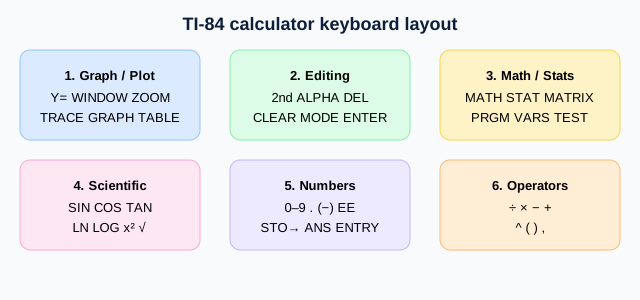
- Y= Editor: Enter up to 10 functions (Y1–Y0) for simultaneous graphing.
- WINDOW Settings: Control the viewing window (Xmin, Xmax, Ymin, Ymax, Xscl, Yscl).
- ZOOM Menu: Quickly adjust graph view with presets like ZStandard, ZDecimal, ZSquare, ZTrig.
- TRACE: Move along a plotted function to read exact (x, y) coordinate pairs.
- CALC Menu: Find zeros, intersections, minimums, maximums, derivatives, and integrals graphically.
- MATH Menu: Access advanced functions including abs(), round(), iPart, fPart, and numeric calculus tools.
- STAT Menu: Data entry via lists and a full suite of statistical tests and regressions.
- MATRIX Menu: Define, edit, and operate on up to 10 matrices.
- PRGM: Create and run TI-BASIC programs for automation. The emulator runs the real TI-84 Plus CE operating system (No_AppsCE ROM, no apps installed).
TI-84 for SAT and ACT Exams
The TI-84 is approved for use on the SAT Math section, ACT Mathematics section, AP Calculus, AP Statistics, and most state standardized tests. Mastering it before your exam can significantly boost your score, particularly in data analysis, function graphing, and equation solving.
Practice with our online TI-84 to build speed and muscle memory. Focus especially on: solving systems of equations using matrices, graphing and finding intersections, running regression models on data sets, and evaluating definite integrals numerically. Read the SAT/ACT guide →
Embed this calculator on your site
Teachers, bloggers and school sites: add the free TI-84 calculator to your page with one snippet. Get the embed code → — and print the TI-84 cheat sheet for your classroom.
Frequently Asked Questions
Everything you need to know about using the TI-84 Online Calculator.
Is the TI-84 calculator online really free?
Yes, completely free. There are no subscriptions, no premium tiers, and no hidden charges. Open the calculator on this page and use it instantly.
Do I need to download or install anything?
No download or installation is required. The TI-84 emulator runs entirely in your web browser. It works on Chrome, Firefox, Safari, Edge, and most modern browsers across desktop and mobile.
Does it work on a phone or Chromebook?
Yes. The online TI-84 is fully responsive and touch-friendly. You can tap the calculator buttons on any smartphone or tablet, and iOS and Android both work great.
Can I use the online TI-84 in a real exam?
The online calculator is ideal for practice and studying. During in-person exams (SAT, ACT, AP, etc.) you will need to use a physical approved calculator, as internet access is not permitted. Always check your test's specific calculator policy.
How do I graph an equation?
Press the Y= button on the calculator above and type your equation next to Y1= (use X for the variable). Then press GRAPH. You can adjust the viewing window with WINDOW or use the ZOOM presets.
What is the difference between the TI-84 Plus and the TI-84 Plus CE?
The TI-84 Plus CE features a color display, a thinner and lighter design, a rechargeable battery, and slightly more memory than the original TI-84 Plus. Functionally, both support the same math operations, graphing, and programs. The calculator above is the TI-84 Plus CE emulator.
Can I do matrices on the online TI-84?
Yes. Press 2ND → MATRIX on the calculator above to access the matrix editor. You can define matrices and use the MATH submenu within the MATRIX menu to calculate inverses, determinants, transpose, and more.
How do I switch between degrees and radians?
Press MODE, then use the arrow keys to highlight either "Degree" or "Radian" and press ENTER. The selected mode applies to all trigonometric calculations until you change it.
Does this site support TI-BASIC programs?
The calculator above is the official Texas Instruments TI-84 Plus CE emulator as used in TestNav, running the real TI-84 Plus CE operating system (No_AppsCE ROM — no apps installed). It has the real keypad, graphing, statistics and matrix functions. It loads its emulator code, ROM and faceplate from mn.testnav.com.
Does the calculator save my work?
No. The calculator resets when you close your browser tab, just like removing the batteries from a physical calculator. Calculations are not stored on our servers. If you need to save work, write down your equations or data before closing the session.